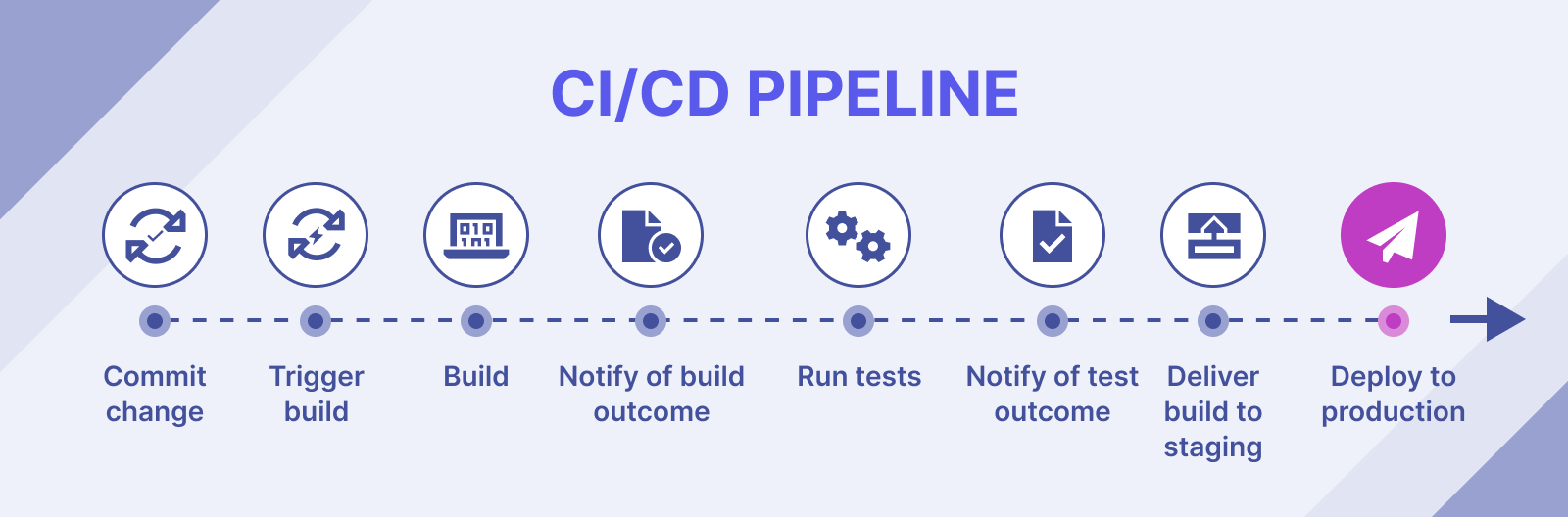
🔍 What is CI/CD?
CI/CD (Continuous Integration/Continuous Deployment) is a methodology that helps automate the software development process, reducing errors, speeding up deployment, and improving product quality.
- Continuous Integration (CI): Continuous integration, helps detect errors early by automatically testing whenever there are changes in the source code.
- Continuous Deployment (CD): Continuous deployment, ensures software is released automatically and quickly.
🌟 Popular CI/CD Tools
🔧 Jenkins
Jenkins is a popular open-source automation server that helps build, test, and deploy software automatically.
📌 Key Features:
- Supports many plugins, easy integration with DevOps tools.
- Intuitive web interface, easy to configure.
- Supports both Windows and Linux environments.
💡 Example: Configuring a simple pipeline in Jenkinsfile
| |
📖 Useful Resources:
🔄 CircleCI
CircleCI is a powerful CI/CD platform that supports many programming languages and integrates well with GitHub and Bitbucket.
📌 Key Features:
- Supports parallel builds to increase processing speed.
- Good integration with Docker and Kubernetes.
- Available in cloud and self-hosted versions.
💡 Example: Configuring a CircleCI pipeline in .circleci/config.yml
| |
📖 Useful Resources:
🛠️ GitLab CI/CD
GitLab CI/CD is a built-in system in GitLab that allows automating testing and deployment processes right within the Git repository.
📌 Key Features:
- Supports full pipeline automation from build, test to deploy.
- Built into GitLab, no external tools needed.
- Supports running pipelines on Docker containers.
💡 Example: Configuring GitLab CI/CD pipeline in .gitlab-ci.yml
| |
📖 Useful Resources:
⚡ GitHub Actions
GitHub Actions is a CI/CD tool integrated directly into GitHub, helping automate testing and deployment processes whenever there are changes in the repository.
📌 Key Features:
- Tightly integrated with GitHub, easy workflow setup.
- Supports many operating systems and programming languages.
- Can use marketplace with thousands of available actions.
💡 Example: GitHub Actions workflow in .github/workflows/main.yml
| |
📖 Useful Resources:
🎯 Conclusion
CI/CD helps accelerate the software development process, minimize errors, and improve product quality. Depending on your needs and working environment, you can choose Jenkins, CircleCI, GitLab CI/CD, or GitHub Actions to deploy your CI/CD system. 🚀
👉 Next step: Learn about Secret Management - the process of storing, managing, and protecting sensitive information such as passwords, API keys, certificates, and access tokens to prevent data leakage and ensure system security. 💡