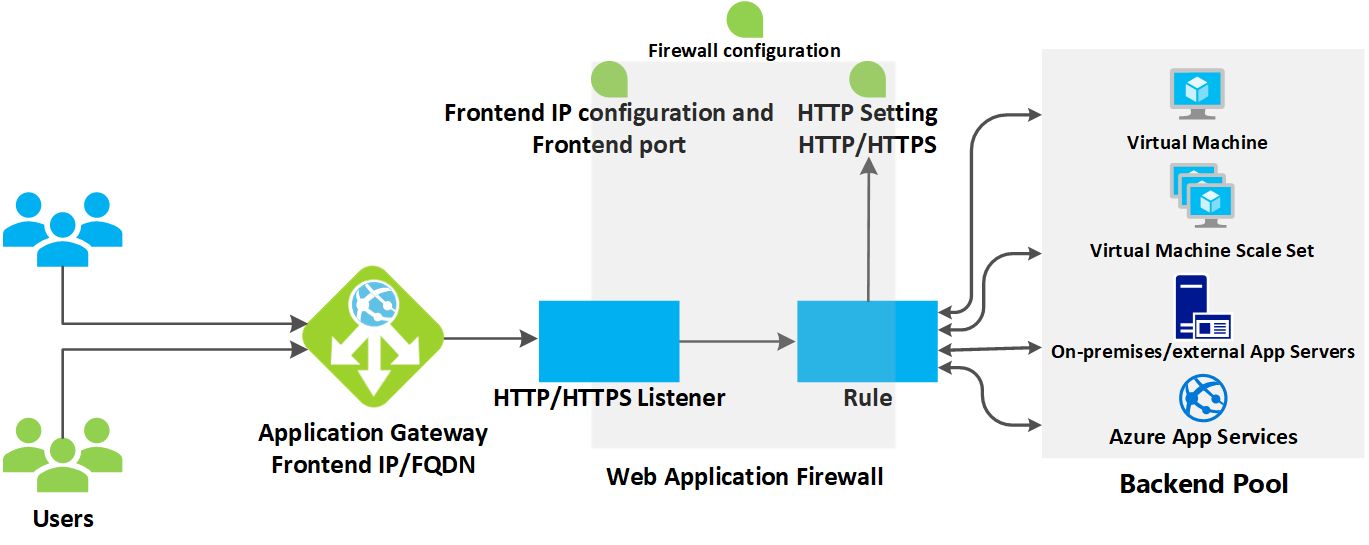
Setting up important network components
This article will help you understand important network components:
🔹 Forward Proxy
🔹 Reverse Proxy
🔹 Load Balancer
🔹 Firewall
🔹 Caching Server
🔹 Web Server
⚖️ Load Balancer
Load Balancer works like a “traffic cop” standing in front of servers and directing client requests to appropriate servers. This helps optimize speed, efficiently utilize resources, and avoid overload situations.
🔹 If a server fails, the Load Balancer will redirect traffic to the remaining servers.
🔹 Can be deployed with algorithms like Round Robin, Least Connections, IP Hash…
🔍 Example Load Balancer configuration with Nginx:
| |
📚 Further reading:
📄 What is Load Balancing?
📄 Load Balancing Algorithms
📄 Nginx Reverse Proxy & Load Balancing
🎥 Video: How does Load Balancer work?
🔁 Forward Proxy
Forward Proxy is an intermediary server standing between client and internet, forwarding requests from client to destination server. It helps with anonymity, security, access control, and content caching.
🔹 Commonly used in enterprise networks to monitor and control access.
🔹 Supports bypassing censorship and geographical restrictions.
🔍 Example Forward Proxy configuration with Squid:
| |
📚 Further reading:
📄 What is Forward Proxy?
📄 Forward Proxy vs Reverse Proxy comparison
🎥 Video: How does Proxy work?
🔄 Reverse Proxy
Reverse Proxy is an intermediary server that receives requests from clients and forwards them to appropriate backend servers. It helps with load balancing, caching, security, and SSL termination.
🔹 Helps hide backend server information to enhance security.
🔹 Supports traffic distribution and application performance optimization.
🔍 Example Reverse Proxy configuration with Nginx:
| |
📚 Further reading:
📄 What is Reverse Proxy?
📄 Nginx Reverse Proxy Guide
🎥 Video: Reverse Proxy and practical applications
🔥 Firewall
Firewall is a network security device that monitors and filters incoming/outgoing traffic based on organization’s security policies.
🔹 Prevents unauthorized access to internal systems.
🔹 Supports data traffic control rules.
🔍 Example Firewall configuration with UFW (Uncomplicated Firewall):
| |
📚 Further reading:
📄 What is Firewall?
📄 Common Firewall types
🎥 Video: Introduction to Firewall
🌐 Nginx
Nginx is an open-source web server, widely used for its ability to handle many concurrent connections with high performance.
🔹 Supports web server, reverse proxy, load balancing, caching.
🔹 Suitable for microservices systems and containers.
🔍 Example simple Nginx configuration:
| |
📚 Further reading:
📄 Nginx installation guide on Ubuntu
🎥 Video: Nginx in 100 seconds
🏛️ Apache
Apache is one of the most popular web servers, supporting many extension modules and compatible with many operating systems.
🔹 Easy to configure with .conf files.
🔹 Supports SSL/TLS, user authentication, URL rewriting…
🔍 Example simple Apache configuration:
| |
📚 Further reading:
📄 Apache homepage
🎥 Video: Installing Apache on Ubuntu
✅ Conclusion
🔹 Load Balancer helps distribute traffic efficiently, reducing server load.
🔹 Forward Proxy supports anonymity, caching, and access control from client.
🔹 Reverse Proxy helps enhance security, caching, and optimize backend systems.
🔹 Firewall protects systems from unauthorized access.
🔹 Nginx & Apache are two popular web servers, serving web content and applications.
By implementing these components, you can build a powerful, secure, and efficient network system. 🚀
👉 Next step: Learn about Networking Protocols - a set of rules and standards that define how devices in a network communicate with each other. They ensure data is transmitted accurately, securely, and efficiently between different systems.