🖧 Networking Protocols
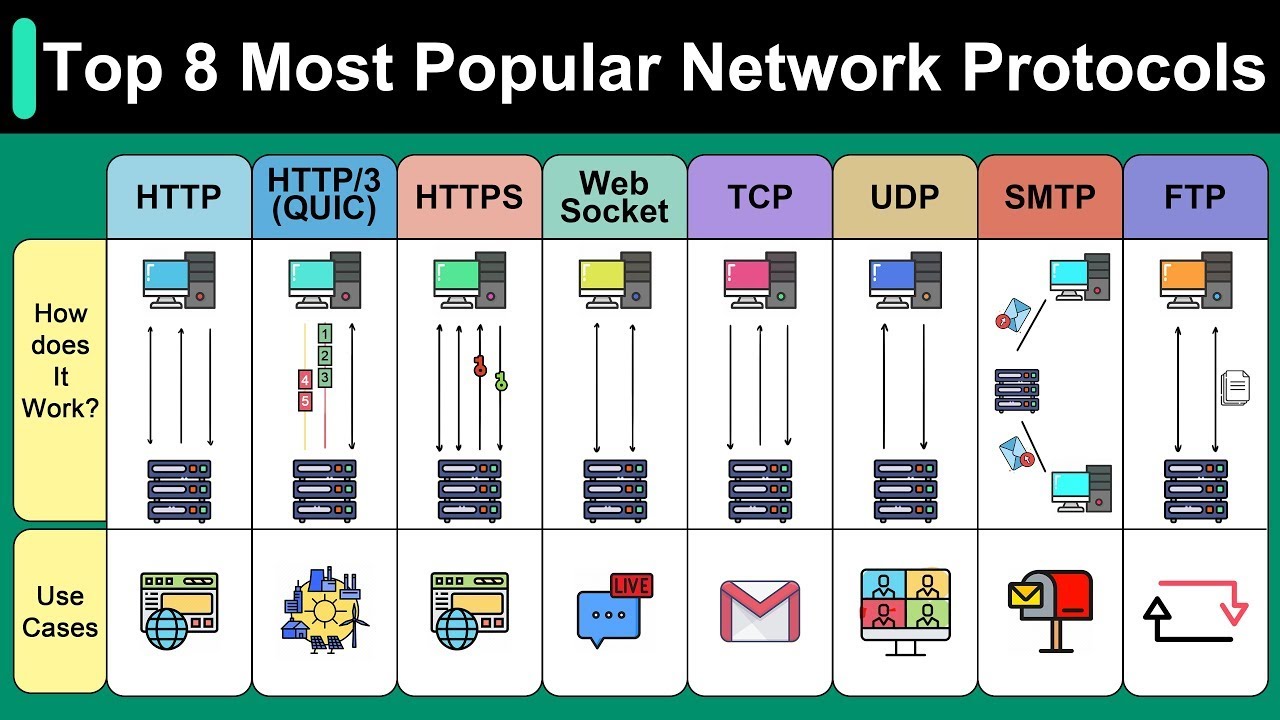
Networking protocols are a set of standardized rules that help data be transmitted, received, and understood correctly across computer networks. They define the format, timing, sequence, and error control during data transmission. Some important protocols include:
- TCP/IP: The foundational protocol suite for Internet communication.
- HTTP/HTTPS: Hypertext transfer protocol used for the web.
- FTP/SFTP: File transfer protocols.
- SMTP/POP3/IMAP: Email transmission protocols.
- DNS: Domain name resolution protocol.
- DHCP: Automatic IP address allocation protocol.
- SSL/TLS: Data security protocols.
- UDP: Connectionless, fast transmission protocol.
🌍 Domain Name System (DNS)
DNS (Domain Name System) is a domain name resolution system that helps convert memorable domain names (e.g., www.example.com) into IP addresses (192.168.1.1) that computers can understand.
🔹 Example DNS configuration in Linux:
| |
🔗 Reference resources:
🌐 HTTP Protocol
HTTP (Hypertext Transfer Protocol) is a data transmission protocol on the web following a request-response model.
🔹 Example sending HTTP requests with cURL:
| |
🔗 Reference resources:
🔒 HTTPS and Security (SSL/TLS)
HTTPS is the secure version of HTTP, using SSL/TLS to encrypt data, ensuring safety during transmission over the Internet.
🔹 Example setting up HTTPS with Nginx:
| |
🔗 Reference resources:
🔑 SSH - Secure Connection
SSH (Secure Shell) is a protocol that enables secure connection to remote servers.
🔹 Example using SSH for remote connection:
| |
🔗 Reference resources:
🎯 Conclusion
Networking protocols are the foundation of all online systems, from web browsing to sending emails. Understanding and knowing how to use them helps improve system security and performance. Try applying the commands above to check and configure your system! 🚀
👉 Next step: Learn about Cloud Providers - companies that provide cloud computing services, allowing individuals and businesses to access resources like servers, storage, databases, AI, and other services over the internet without investing in hardware infrastructure.